
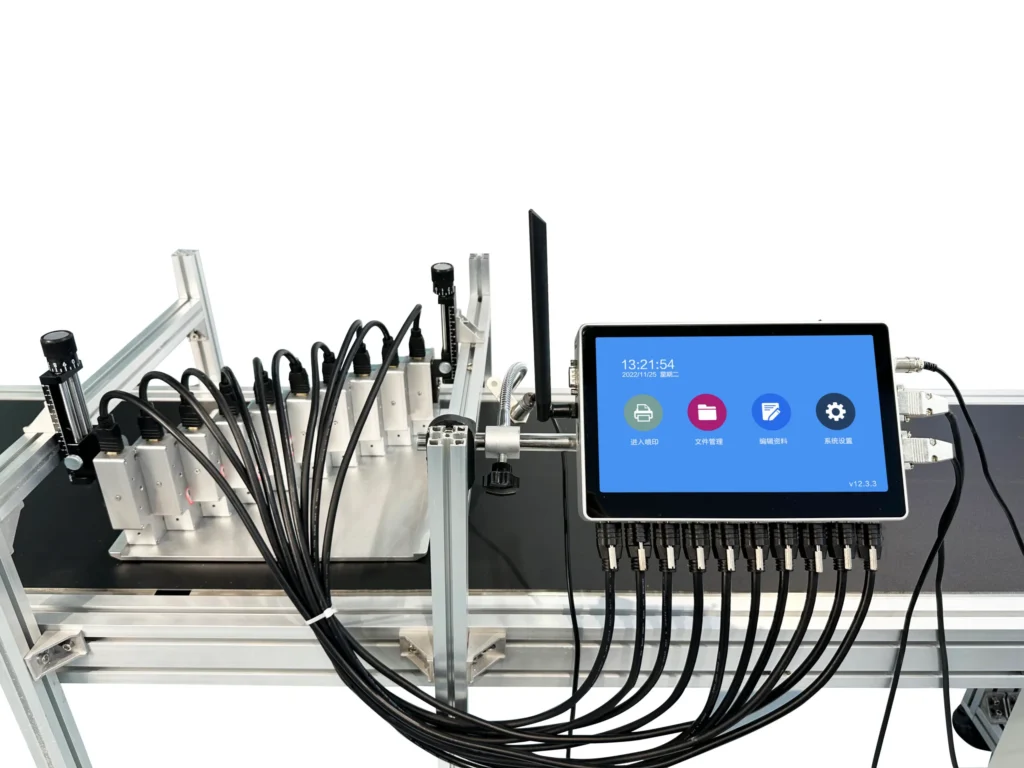
Yes, absolutely. A digital inkjet printer—specifically one equipped with UV-curing technology—handles PVC cards quite well. The smooth, non-porous surface of PVC that makes traditional printing impossible actually works beautifully with UV inkjet methods. The ink cures instantly upon contact, creating durable prints for ID cards, membership cards, gift cards, and countless other applications.
This wasn’t always the case though. Older inkjet technology struggled with plastics.
Why a Digital Inkjet Printer Works on PVC Material
Understanding why this works requires looking at how UV inkjet differs from conventional printing. Standard inkjet printers rely on absorption—paper soaks up liquid ink, which then dries through evaporation. PVC doesn’t absorb anything. Liquid ink simply beads up and smears.
A digital inkjet printer using UV technology takes a completely different approach. The printer deposits ink droplets onto the PVC surface, and UV LED lamps immediately cure that ink through photopolymerization. The ink transforms from liquid to solid in milliseconds. No absorption needed. No drying time required.
The result bonds mechanically to the card surface rather than soaking in. Properly cured prints resist scratching, won’t smear from handling, and maintain color vibrancy over time.
The Role of Surface Energy
PVC has what’s called low surface energy—liquids want to bead up rather than spread evenly. This property makes PVC waterproof and easy to clean but creates challenges for printing.
UV inks formulated for plastics address this through specialized chemistry. They contain adhesion promoters and surface-wetting agents that help ink spread properly before curing locks everything in place. Some printers also apply primer layers automatically.
Types of PVC Cards Suitable for Digital Inkjet Printer Output
Not all PVC cards are created equal, and understanding the differences helps achieve better results.
| Card Type | Thickness | Common Use | Druckqualität |
|---|---|---|---|
| Standard PVC | 0.76mm | ID cards, membership | Ausgezeichnet |
| Thin PVC | 0.30mm | Overlay cards | Very good |
| Composite PVC/PET | 0.76mm | Smart cards | Good to excellent |
| Frosted PVC | 0.76mm | Premium cards | Ausgezeichnet |
| Metallic PVC | 0.76mm | VIP cards | Good (test first) |
| Transparent PVC | Various | Special effects | Requires white ink |
Standard CR80 cards—the credit card size everyone recognizes—work perfectly in most setups. These measure 85.6mm by 53.98mm with that familiar 0.76mm thickness. A digital inkjet printer designed for card production typically includes fixtures or jigs specifically sized for this format.
Surface finish matters too. Glossy cards show vibrant colors but may reveal fingerprints more readily. Matte surfaces hide handling marks but can appear slightly less vivid. Frosted cards offer an interesting middle ground with that premium tactile feel.
Preparation Steps for PVC Card Printing
Achieving consistent quality requires proper preparation. Shortcuts here lead to adhesion problems or inconsistent results.
Essential preparation steps:
1. Remove cards from packaging carefully
2. Wear lint-free gloves during handling
3. Clean surfaces with isopropyl alcohol if needed
4. Allow complete evaporation before printing
5. Load cards into printer fixtures properly aligned
6. Verify print settings match card specifications
7. Run test prints on sample cards first
The cleaning step deserves emphasis. PVC cards often arrive from manufacturers with release agents or processing residues invisible to the eye. These contaminants interfere with ink adhesion. A quick wipe with IPA removes most issues.
Static electricity poses another challenge. PVC generates static readily, attracting dust particles that create print defects. Anti-static cleaning or ionizing equipment helps in production environments.
Common Applications for Printed PVC Cards
The ability to print directly on PVC cards opens numerous possibilities for businesses and organizations.
Popular applications include:
• Employee ID badges and access cards
• Membership and loyalty program cards
• Gift cards and promotional cards
• Student identification
• Visitor passes and temporary credentials
• Event badges and VIP passes
• Library cards
• Healthcare identification
What makes digital inkjet printing particularly valuable here involves customization. Each card can be completely unique—different names, photos, numbers, barcodes—without changing print plates or screens. Variable data printing happens automatically.
Production speeds vary by machine, but modern equipment handles hundreds or thousands of cards daily. This makes small-batch production economically viable, something impossible with traditional offset or screen printing methods.
Quality Factors and Troubleshooting
Several factors influence final print quality on PVC cards. Understanding these helps troubleshoot problems when they occur.
Key quality factors:
• Ink formulation compatibility with PVC
• UV lamp intensity and curing completeness
• Print resolution settings
• White ink opacity for colored cards
• Environmental conditions (temperature, humidity)
• Card surface condition and cleanliness
For businesses exploring Vollfarbe digital printing capabilities on PVC and other specialty substrates, running these tests during initial setup prevents customer complaints and reprinting costs down the road.
Adhesion Testing
Testing adhesion before committing to large production runs saves headaches later. The standard approach involves the cross-hatch test—scoring the printed surface with a blade grid pattern, applying tape, then pulling it off. Properly adhered ink stays put.
For businesses exploring full color digital printing capabilities on PVC and other specialty substrates, running these tests during initial setup prevents customer complaints and reprinting costs down the road.

Final Thoughts on PVC Card Printing
A digital inkjet printer equipped with proper UV-curing technology handles PVC cards remarkably well. The technology has matured significantly, and what once seemed impossible—direct inkjet printing on plastic—now happens routinely in print shops and production facilities worldwide. The combination of customization flexibility, reasonable production speeds, and durable output makes this approach increasingly popular for card production applications of all types.
FAQ
How durable are prints on PVC cards from a digital inkjet printer?
Lorem ipsum dolor sit amet, consectetur adipiscing elit. Ut elit tellus, luctus nec ullamcorper mattis, pulvinar dapibus leo.
Can both sides of a PVC card be printed?
Yes, duplex printing on PVC cards works well. The process requires printing one side, allowing brief settling time, then flipping and printing the reverse. Some printers automate this process while others require manual intervention. Registration between front and back demands careful attention to achieve professional results.
What resolution can be achieved on PVC cards?
Modern digital inkjet equipment achieves impressive resolution on PVC—typically 720 to 1440 DPI or higher. Fine text remains crisp and readable, photographs reproduce with smooth tonal gradations, and small details like microtext or intricate logos print clearly. The smooth, consistent PVC surface actually helps maintain sharpness compared to textured materials.