
With the advent of the digital age, printing demands have become increasingly diverse, and expectations for print quality continue to rise. Against this backdrop, inkjet printers, as a commonplace printing device, have naturally drawn attention for their performance and applicability. This article will delve into the performance characteristics, application scenarios, and future development trends of inkjet printers.
Ⅰ. Fundamental principles of inkjet printers
1. Working Principle
Inkjet printers work by spraying tiny droplets of ink onto paper or other materials. Each droplet comes from a nozzle in the print head. The printer moves the print head back and forth across the page, building up the image or text line by line. This process allows for sharp details and vibrant colors.
One thing that sets Printers apart from other printing technologies is how they apply ink and handle different materials. Inkjet printers can print on many types of paper, including cardstock, because the ink dries quickly and does not require heat. This makes them a good choice for projects that use thicker or more delicate materials.
2. Main Components
Several main components help inkjet printers deliver high-quality results, especially on heavy materials like cardstock:
- Print Head: This part contains many tiny nozzles that spray ink onto the paper. The size and precision of these nozzles control the sharpness and detail of the print.
- Ink Cartridges: These hold the liquid ink. Some printers use separate cartridges for each color, while others combine colors in one cartridge.
- Media Feed System: This system moves the paper through the printer. Many printers have both front and rear feeding options. Rear feeds are especially helpful for thick cardstock, as they allow the paper to move in a straight path and reduce the risk of jams.
- Control Panel and Settings: Users can adjust settings for different media types. Advanced media settings let the printer slow down or use more ink for thicker papers, which helps prevent smudging and ensures even coverage.
- Manual Feed Slot: Some models include a manual feed slot for specialty papers. This feature gives users more control when printing on delicate or heavy materials.
Ⅱ. Advantages of inkjet printers
1. Color and Sharpness
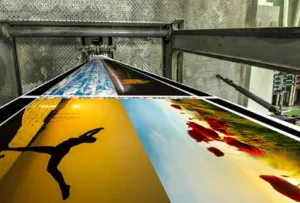 Inkjet printers stand out for their ability to deliver bright colors and crisp lines, even on textured cardstock. They use advanced technology to spray tiny droplets of ink, which helps create sharp images and smooth gradients. Users can adjust printer settings to match the thickness of the cardstock, usually between 200 and 800gsm. This adjustment helps the printer handle the paper smoothly and prevents jams. Pigment-based inks work best for vivid, fade-resistant colors. Regular cleaning of nozzles and rollers keeps prints looking sharp and prevents smudges.
2. Finish and Texture
Inkjet printers can handle many types of cardstock finishes and textures. This flexibility lets users pick the best look for their projects.
- Smooth finishes give the best detail and color accuracy.
- Linen, vellum, woven, felt, embossed, Kraft, and laid textures are all possible with the right cardstock.
- These options help users create unique invitations, greeting cards, or business cards.
3. Durability
Cardstock printed with printer feels sturdy and lasts longer than regular paper. The thicker material resists bending and tearing, making it perfect for projects that need to hold up over time. Inkjet paper absorbs liquid ink quickly, so prints dry fast and resist smudging. This feature makes printers a top choice for colorful graphics and images on durable cardstock.
Ⅲ. Printed Materials Application
1. Metal
Printing on metal opens up new possibilities for industries like aerospace, automotive, and medical devices. They often need direct printing on aluminum or stainless steel. Printers use special inks to handle these tough surfaces. Metal printing requires careful ink selection. UV and LED-curable inks help prints last longer and resist harsh conditions.
2. Fabric
Printers have become popular for printing on fabric. They work well with cotton, polyester, and other materials. People use them for clothing, upholstery, napkins, rugs, gifts, and bags. Advancements in technology allow for higher resolutions and faster speeds. This versatility makes inkjet printing a top choice for custom designs and small batches.
3. Paper
Paper remains the most common material for inkjet printing. Users can choose from lightweight sheets for flyers to heavyweight cardstock for business cards.
4. Plastic
Printing on plastic requires special attention. Some plastics need pre-treatment to help ink stick. Inkjet printers can print on coated plastics for labels, packaging, and signage. The results look sharp and vibrant, but users should check compatibility before starting a project.
Ⅳ. Tips for Choosing an Inkjet Printer
1. Printing Requirements
Choosing the right printer starts with understanding what the user needs. Some people want to print colorful invitations, while others need sharp business cards. Inkjet printers handle many types of media, including cardstock, glossy photo paper, and fabric.
People should match the printer’s capabilities to their project. For thick cardstock, look for models with a rear feed slot. Adjust the paper guides to fit the cardstock snugly. Always check the printer’s manual for supported paper weights.
2. Select an Inkjet Printer Manufacturer
Not all printers are created equal. Some brands offer better support for heavy cardstock and specialty media. When picking a manufacturer, users should look for these features:
- Reliable media feed systems that reduce jams.
- Easy-to-use maintenance options for cleaning print heads and rollers.
- Good customer support and clear manuals.
Regular maintenance keeps the printer running smoothly. Clean the printer, check the print heads, and replace rollers as needed. Monitor ink levels and cancel unnecessary print jobs to avoid slowdowns. Place the printer in a well-ventilated area and follow the manufacturer’s care instructions.
Ⅴ. Conclusion
With the continuous advancement of technology, inkjet printers will continue to play a vital role in the printing sector, offering users more efficient, economical, and environmentally friendly printing solutions.